A month-end close checklist from a bookkeeping team's own monthly routine: what to do, in what order, and when the books are really closed.
Every month the work follows the same order: statements in, bank accounts first, receivables next, and down the list to the lock. Most closes go wrong in the steps that get skipped, not in the ones everybody knows. This is our month end close checklist, day by day, with the steps people skip most and a free spreadsheet you can use for your own close.
The month end close process, day by day
This is how we run a close. It takes about five to six days. Day 1 starts once we have your statements and invoices.
| Day | What happens | Who | Output |
|---|---|---|---|
| Day 1 | Bank account reconciliations, after we collect statements and invoices from you | Bookkeeping team, with the client for documents | Reconciled bank accounts |
| Day 2 | Close the bank accounts, then reconcile receivables | Bookkeeping team | Bank accounts closed, receivables reconciled |
| Day 3 | Reconcile taxes and prepare the returns for the client | Bookkeeping team | Tax reconciliation, returns prepared |
| Day 4 | Manage the cash and payroll cycles, reconcile tax credits, then reconcile vendor payments | Bookkeeping team | Cash and payroll cycles managed, credits and vendors reconciled |
| Day 5 | Summarise everything and resolve the client's queries | Bookkeeping team, with the client for queries | Summary and answered queries |
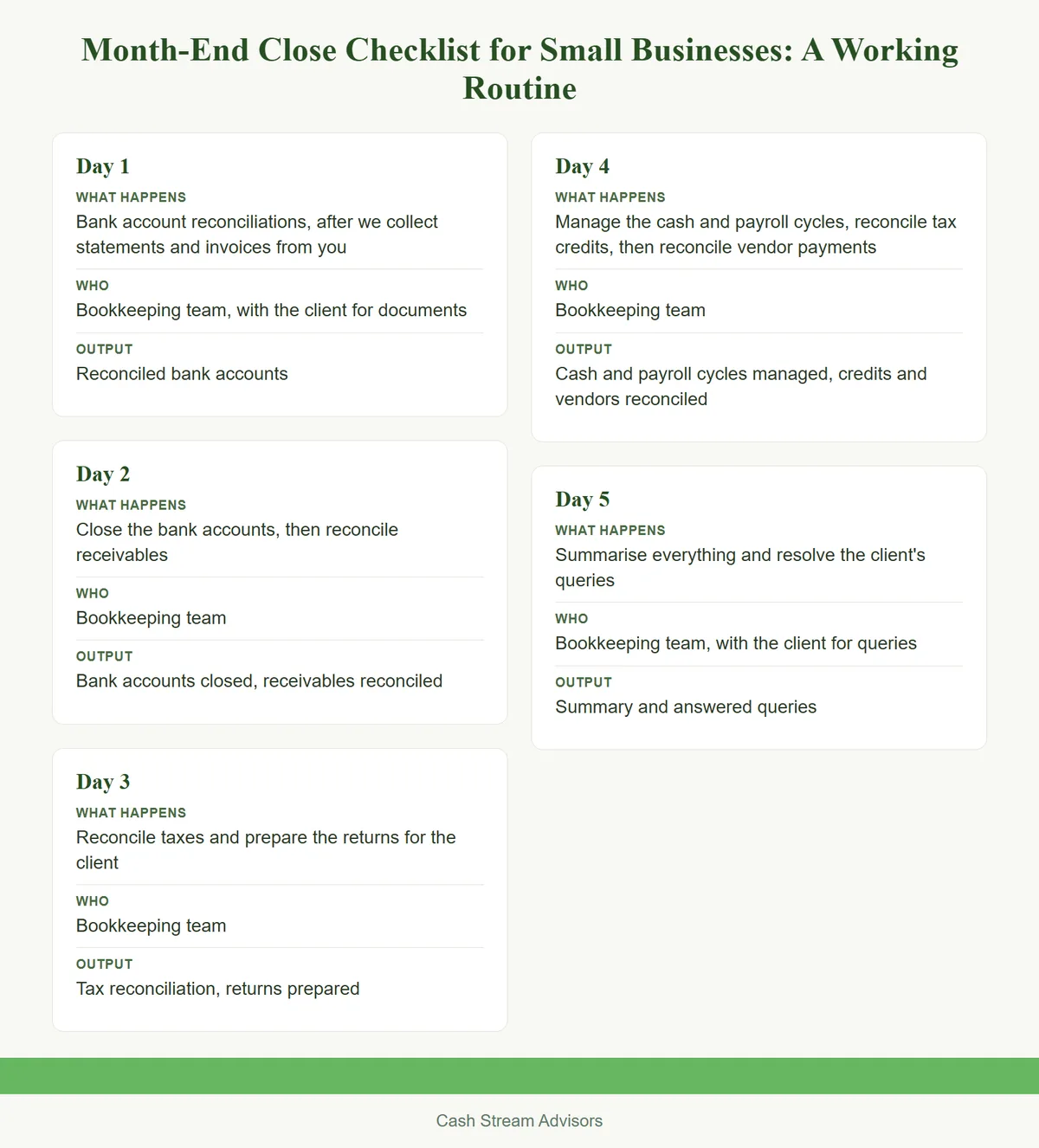
Day 4 holds the steps that are most often skipped, tax credits and vendor payments. A sixth day is sometimes needed, and what slows a close most is collecting the documents. For the reconciliations themselves, read Bank Reconciliation Not Matching? Common Errors and How to Fix Them.
What people skip
Four steps are skipped most often, and each one costs time later.
- •
Customer ledger confirmations. With your consent, we reach out to your customers as your finance team. We find differences between your ledger and theirs that nothing else shows.
- •
Vendor statements. We ask vendors for a ledger or confirmation statement, which helps us reconcile every account. Without it, vendor balances rest on one side's records.
- •
Business spending on personal cards and cash. Owners often fund the business from personal accounts and forget to send the statements. Expense booking, advances and prepaid expenses are then wrong.
- •
Tax credits. They are reconciled last and often skipped.
A skipped step does not go away. The difference turns up at the next close, or at year-end, when it is harder to trace.
What "closed" means
A month is closed when the period is locked, the reports are sent, and the open questions are cleared. We lock the period so that nobody can change it, after we have your consent and the consent of your accounts department, if you have one.
Each tool has its own feature. In QuickBooks Online, the closing date is set under Settings, Account and settings, then the Advanced tab, in the Accounting section, by turning on Close the books. You choose whether users see a warning, or a warning and a password, before they change anything dated on or before that date. In Zoho Books, the transaction lock sits under Accountant, then Transaction Locking, and you can lock one area at a time or everything at once. Zoho notes that transactions dated on the lock date itself can still be changed, so set the date to the day after your cut-off. Xero uses lock dates, set in its settings. For software choice, read QuickBooks vs Zoho Books vs Xero: Which Suits a Small Business.
If you outsource: what you should receive each month
Owners who outsource to us receive a monthly pack.
- •
Sales tax reconciliation
- •
Payroll reconciliation
- •
A summary of the chart of accounts
- •
The trial balance
- •
Answers to any queries raised during the close
We do not promise any timing we do not meet. For what the first months of outsourcing look like, read What to Expect When You Outsource Your Bookkeeping.
Free month-end checklist
Download our free month-end close checklist as a spreadsheet. It follows the routine above, day by day, with a column for who does each step and a place to tick it off. Use it for your own close, or to check your bookkeeper's.
Talk to an advisor
If you would like us to run your close, message us on WhatsApp for a quote, book a consultation, or write to contact@cashstreamadvisors.com.
This Insights article is general information, not advice on a specific transaction. Read our disclaimer and regulatory compliance pages.
US bookkeeping service
INSIGHTSQuickBooks vs Zoho Books vs Xero: Which Suits a Small Business
INSIGHTSBank Reconciliation Not Matching? Common Errors and How to Fix Them
INSIGHTSCatch-Up Bookkeeping: Getting Months or Years of Books Current
INSIGHTSWhy Your Books Must Be Ready Before Your Tax Return Is Filed
INSIGHTSChart of Accounts Setup for a New Business: Structure and Mistakes
SERVICEAll insights
ABOUTAbout Cash Stream Advisors
CONTACTContact us
Official references
Bookkeeping
Monthly books, catch-up and cleanup, and tax filing in QuickBooks, Zoho Books or Xero., handled so it does not become the subject of your next article.